In this article, we'll focus on a store rebuild scenario where Sylius becomes the source of truth for the migrated data. We'll explain how to design a migrator that can be run repeatedly throughout the project while the legacy system remains operational.
Migrating Data from a Legacy System to Sylius: Which Approach Should You Choose?
One of the first decisions is how to transfer the data. In the scenario described here, we use a migrator designed to run multiple times. This isn't a one-off script executed immediately before the new store goes live.
The migrator runs during the initial import, on subsequent test environments, after changes to migration rules, and finally before traffic is switched to Sylius. Each run updates the data in the new system based on the current state of the legacy system.
This matters because the existing store continues operating throughout the project, accepting new orders and other changes.
Batch Migration vs. Event-Driven Synchronization
An alternative is to perform a one-time migration and then synchronize subsequent changes through events published by the legacy system. These could include events such as ProductPriceChanged, CustomerRegistered, or ProductDeleted, processed through a message queue and Symfony Messenger.
Event-driven synchronization offers several advantages, but it requires the legacy system to support the necessary mechanisms.
| Area |
Repeated Batch Migration |
One-Time Migration with Legacy Events |
| Data updates |
Data is refreshed during subsequent migrator runs. |
Sylius responds to published events. |
| Legacy system load |
Each run requires reading the data again. |
Only changes are processed, without scanning the entire database. |
| Record deletion |
The migrator must identify records missing from subsequent runs. |
An event such as ProductDeleted explicitly signals deletion. |
| Information about changes |
The migrator sees the current state of the data. |
Events can also communicate the intent behind a change. |
| Gradual migration of functionality |
The scenario described involves rebuilding the entire system. |
Individual areas can be migrated incrementally. |
| Legacy system requirements |
The migrator can use a database, API, or other data sources. |
The legacy system must publish reliable events. |
Event-driven synchronization allows data to be kept up to date continuously, rather than only reflecting the state captured during the most recent migrator run. This is particularly important for prices and inventory levels.
Events can also carry more information than simply the new value of a field. Knowing that a price was reduced as part of a promotion is more useful when reconstructing price history than reading the current value from a price column.
In practice, however, implementing this approach isn't always possible. The limitations often come from the legacy system itself:
No event infrastructure. The system doesn't publish events and lacks the necessary infrastructure, such as message queues, an outbox mechanism, or webhooks.
Risky or unjustified changes to legacy code. Modifying the old application may be too risky or not worth the investment, particularly when it has no tests and will soon be decommissioned.
Changes made outside the application layer. Data may be modified through direct database operations or ERP imports executed by cron jobs. Events emitted by the application won't detect those changes.
Under these conditions, repeatedly executed batch migration remains a viable approach. The rest of this article focuses on implementing that solution.
However, many of the principles discussed, including validation, sanitizers, and migration order, also apply to one-time imports.
What Data Can Be Migrated to Sylius?
The scope of migration depends on what the new store needs. Data that can be migrated includes:
Customers and their marketing consents.
Taxonomy, including the category tree.
Products, variants, prices, options, and attributes.
Product associations, such as bundles and related products.
Product reviews.
Orders.
Price history related to the EU Omnibus Directive.
However, this list alone isn't enough to plan a migration. You also need to understand how the data is represented in the legacy system, what information must be available in Sylius, and which relationships need to be preserved.
Does All Historical Data Need to Be Recreated Using the Full Sylius Data Model?
Historical orders are a good example. An order in Sylius is a complex aggregate that includes order items, payments, shipments, adjustments, and state machine states, among other elements. Recreating all these components for historical records can be very expensive.
Yet the business may only need the total value of a customer's previous orders for a discount program, or a list of past purchases displayed in their account.
In such cases, a simplified, read-only order history view may be sufficient.
Before migrating data, it's therefore worth establishing exactly how it will be used in the new system.
What Additional Data and Relationships Need to Be Created?
Not all information required by Sylius necessarily exists in the legacy system.
For example, a product review in Sylius requires an author represented by a Customer entity. If the old store allowed users to submit reviews using only their name and email address, the migrator must first create the corresponding customer records.
It's also important to account for the invariants that Sylius maintains during normal operation.
Creating a customer involves more than inserting a Customer record. Registration also creates a ShopUser, and depending on the project, additional elements may be created, such as a wishlist, a loyalty program account, or GDPR consent log entries.
The migrator must account for these dependencies. Otherwise, a customer may exist in the database while some store features fail to work correctly.
The legacy database doesn't have to be the only data source, either. Some information may be created specifically for the new store, meaning the migrator may need to handle multiple sources, such as a database and CSV files.
Key Challenges in Data Migration to Sylius
Data migration rarely involves simply copying records from one table to another. Challenges arise both from differences in data structures and from the rules enforced by the new system.
Migration Order and Entity Dependencies
Data in an e-commerce store is interconnected. Products belong to categories, orders reference products, and reviews require both a product and a customer.
Rather than migrating everything at once, it's worth separating the creation of entities from establishing relationships between them.
An example migration sequence might look like this:
Attribute types, product options, and association types.
Taxonomy.
Products and variants, including prices.
Attribute values and product associations.
Assigning products to categories and setting their main taxon.
Customers.
Reviews that require both a product and a customer.
The same principle also applies within a single resource.
For example, taxonomy can be migrated in two passes. First, we create all categories as a flat list. Only then do we assign their parent categories. This way, it doesn't matter whether a parent category has already been processed.
Validating Data from the Legacy System
Data considered valid in the old system may not satisfy Sylius validation rules.
For example, the legacy system may have allowed a single-character product name, while Sylius requires at least two characters. It may also have applied insufficient validation to email addresses or other fields.
During migrations, we've encountered issues such as:
Dates stored as 0000-00-00 or 0000-00-00 00:00:00, which need to be converted to null.
Postal codes with arbitrary formats, and street or city names containing no letters.
Email addresses containing uppercase characters or trailing spaces, resulting in multiple records for the same customer.
Duplicate product slugs.
The migrator should map legacy data to Sylius entities and then validate those entities against the rules of the new system.
Every invalid record requires a decision: can the data be corrected, or should the record be skipped and the error logged?
Mapping Different Data Models
The legacy data model almost never maps to the Sylius model on a one-to-one basis.
Common differences include:
| Challenge |
Example |
Implication for the Migrator |
| No one-to-one equivalent |
A simple product in the legacy system has no variants. |
A variant required by Sylius must be created. |
| Different data granularity |
Product size is stored as text in a single record. |
The data may need to be split into options and variants. |
| Combining multiple records |
Several legacy records correspond to one Sylius entity. |
Rules for merging those records must be defined. |
| No corresponding field in the target model |
Information from the legacy system has no equivalent in Sylius. |
Decide whether to extend the entity, use an attribute, or omit the field. |
| Different data formats |
Prices stored as floats, HTML descriptions, or T/N flags. |
Appropriate data conversion is required. |
| Different representations of predefined values |
Values are represented by identifiers defined in code. |
They must be mapped to the target data model. |
In Sylius, prices are represented as integers in the smallest units of a currency, such as grosze for PLN. In a legacy system, they may be stored as floating-point numbers. This is one example of a difference that needs to be handled explicitly.
Before implementation begins, it's worth documenting how legacy entities map to Sylius entities. Every one-to-many (1:N) relationship, many-to-one (N:1) relationship, or missing equivalent represents a design decision that should be agreed upon with the business.
How to Synchronize Data Across Multiple Migrator Runs
When the legacy system remains operational, its data continues to change between migration runs. In our scenario, each subsequent run should reflect three types of changes:
A new record in the legacy system should be added to Sylius.
A modified record should be updated.
A deleted record should be handled appropriately in Sylius.
The last case doesn't necessarily mean physically deleting the entity. The correct approach depends on the type of resource and its relationships.
Legacy ID: How to Identify Previously Migrated Records
To update existing data, the migrator needs to know which Sylius record corresponds to each record in the legacy system. For this purpose, every migrated entity receives an identifier from the old system:
#[ORM\Column(name: 'legacy_id', type: 'integer', unique: true, nullable: true)]

private ?int $legacyId = null;
The uniqueness constraint prevents two Sylius records from being created for the same legacy identifier.
The field remains optional because entities created directly in Sylius don't have an identifier from the old system.
Mark-and-Sweep: How to Detect Deleted Records
Creating and updating records is relatively straightforward. Detecting deletions is more difficult because a record that no longer exists in the legacy system cannot be retrieved.
One solution is the mark-and-sweep mechanism, familiar from garbage collectors.
In the migrator, it works as follows:
At the beginning of each run, generate a unique identifier, for example, $legacyMigrationId = uniqid().
Every entity created or updated during that run receives this identifier in its legacy_migration_id field. This is the mark phase.
After migration of a particular resource is complete, identify records carrying an identifier from an earlier run. This is the sweep phase.
A record that wasn't encountered during the current run may no longer exist in the legacy system. However, that doesn't mean it can always be deleted.
How to Safeguard Record Deletion
The sweep mechanism requires separate rules for different resource types.
A product purchased in the new store is linked to order items. Instead of deleting such products and variants, we disable them and detach them from the migrator by setting $legacyId to NULL.
Deleting a parent category must not leave orphaned child categories. Before deleting obsolete categories, we move their subcategories to the root of the taxonomy tree and then recalculate their positions:
ROW_NUMBER() OVER (

    PARTITION BY parent_id

    ORDER BY position

)
For customer accounts, it may be more appropriate to allow creation and updates without deletion. An account already created in Sylius shouldn't disappear simply because it doesn't exist in the legacy system.
The sweep phase must only be executed for resources whose migration has been completed during the current run. Interrupting a command halfway through must not result in the deletion of records that haven't yet been processed.
A record whose update fails validation may still exist in the legacy system. It must therefore not be deleted during the sweep phase. Instead, it should retain its last valid state and be marked with the identifier of the current migration run. We'll cover the details of handling this type of error in the validation section.
How to Protect Changes Already Made in Sylius
Imagine that a product has been migrated and an administrator subsequently edits its name or description directly in Sylius. During the next migrator run, values from the legacy system could overwrite those changes.
One approach is to treat the legacy system as the source of truth for a particular value until that value is modified in Sylius. Once that happens, Sylius takes ownership of the specific field.
To implement this, we use a property blacklist, a list of fields that the migrator should no longer update.
The blacklist can be stored in a JSON column on the migrated entity:
#[ORM\Column(

    name: 'legacy_migrator_properties_blacklist',

    type: 'json',

    options: ['default' => '[]']

)]

private array $legacyMigratorPropertiesBlacklist = [];
If we want to exclude an entire entity from migration, we can use an agreed-upon value, such as *.
There's no need to implement this mechanism for every property from the outset. We can start with fields that administrators modify most frequently, such as product names and descriptions, and extend the solution later.
Automatically Detecting Changes
Administrators shouldn't have to manually flag every field they modify.
We can use Sylius resource events, such as sylius.*.pre_update, and inspect the Doctrine UnitOfWork changeset to determine which values have changed.
The listener should only run for entities originating from the migration, meaning those whose legacyMigrationId is not null.
We also need to account for translated fields, such as name and description, and data stored in separate entities, such as addresses. These have their own changesets.
There's another important limitation: sylius.*.pre_update events are triggered by Sylius HTTP controllers when records are edited through the administration panel. Changes made through APIs, imports, or commands require separate handling.
Respecting the Blacklist During Mapping
The best place to check the blacklist is in the mapper responsible for assigning values to entities:
if (!$product->isPropertyBlacklistedFromLegacyMigrator('name')) {

    $product->setName($legacyProduct['name']);

}
It's also worth displaying an indication in the administration panel when a field is no longer synchronized with the legacy system. This helps explain why subsequent changes made in the old system don't appear in Sylius.
Migrating large numbers of records requires careful control over both the number of database queries and the amount of data held in memory.
The N+1 query problem can occur when a migrator retrieves basic data from the legacy system and then executes additional queries for each individual record to fetch missing information.
To avoid this, we follow a simple rule: all data required by a processor must be available when the processor receives it.
Data is retrieved from the legacy system in one designated place. The processor doesn't perform additional reads. The exception is the validation error recovery mechanism described later, which operates outside the main processing flow.
We apply a similar approach on the Sylius side.
For each batch of records, we retrieve a map of legacy identifiers to their corresponding entities in a single query. Doctrine allows us to index the results using indexBy:
public function findAllByVariantLegacyIds(array $legacyIds): array

{
    return $this->entityManager->createQueryBuilder()
        ->select('o')
        ->from(ProductVariant::class, 'o')
        ->indexBy('o', 'o.legacyId')
        ->andWhere('o.legacyId IN (:legacyIds)')
        ->setParameter('legacyIds', $legacyIds)
        ->getQuery()
        ->getResult();
}
The migrator can then check whether a record exists using isset($map[$legacyId]), without executing a separate query for every entity.
For bulk updates of simple fields that don't require validation, an entire batch can be updated with a single query.
One example is UPDATE ... FROM (VALUES ...) in PostgreSQL:
UPDATE sylius_product

SET main_taxon_id = data.main_taxon_id::INTEGER

FROM (VALUES (?, ?), (?, ?), ...) AS data(product_id, main_taxon_id)

WHERE sylius_product.id = data.product_id::INTEGER
Batch Processing and Doctrine Memory Management
Doctrine's UnitOfWork retains references to managed entities. During a large migration, this can eventually exhaust the available memory.
To prevent this, we use several safeguards:
Batch processing. We divide the data into batches, for example, 1,000 records at a time. After each batch, we call flush() and clear() to persist changes and release the references held by Doctrine.
Running in production mode. The command requires --env=prod --no-debug. In debug mode, Symfony may collect information about a very large number of SQL queries. This requirement can be deliberately overridden using --force.
Disabling query logging. We create the database connection through DriverManager, using the NullLogger middleware.
Monitoring memory consumption. At the end of execution, the command reports memory_get_peak_usage(), making it easier to identify performance regressions after changes.
These mechanisms matter not only for migration speed but also for ensuring that a migration can actually complete when processing large datasets.
Handling Sylius Side Effects During Migration
Sylius responds to entity changes through listeners and observers. This behavior is desirable during normal store operations, but it can produce incorrect results when importing historical data.
Price history is a good example. When a price changes, Sylius creates an entry in ChannelPricingLogEntry. If the migrator triggered this mechanism during every run, the price history would contain migration dates rather than the actual dates of price changes in the legacy system.
To prevent this, we disable the relevant observer during product migration using a decorator:
#[AsDecorator(

    Sylius\Bundle\CoreBundle\PriceHistory\EntityObserver\

    CreateLogEntryOnPriceChangeObserver::class

)]

final readonly class CreateLogEntryOnPriceChangeObserver

    implements EntityObserverInterface

{

    public function supports(object $entity): bool

    {

        if (!$this->featureToggle->isEnabled()) {

            return false;

        }

        return $this->decorated->supports($entity);

    }

    public function onChange(object $entity): void

    {

        $this->decorated->onChange($entity);

    }

    public function observedFields(): array

    {

        return $this->decorated->observedFields();

    }

}
We disable the observer for the duration of product migration and then enable it again:
$this->featureToggle->disable();

// Product migration

$this->featureToggle->enable();
Price history is reconstructed through separate actions, using the dates when prices were effective in the legacy system. We also go back to the beginning of the period used to determine the lowest price before a reduction.
This ensures that the date when data was migrated isn't mistaken for the date when a price actually changed.
Designing the Architecture of a Sylius Data Migrator
To make a migrator maintainable and safe to run repeatedly, it's worth separating its responsibilities.
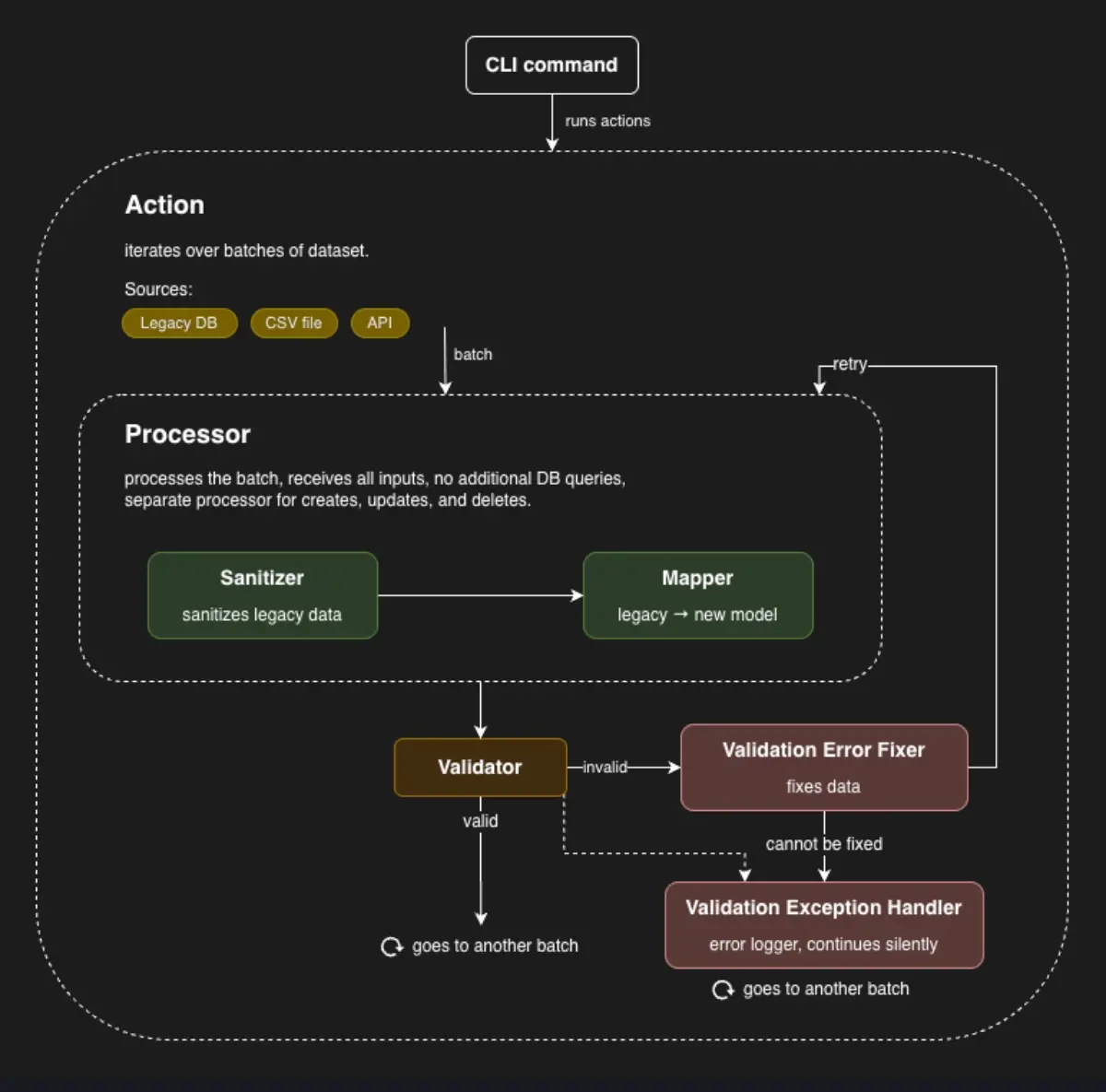
The approach described here uses actions, processors, sanitizers, mappers, and separate mechanisms for validation and error handling.
Actions: Data Retrieval and Migration Orchestration
An action can be compared to an HTTP controller. It should remain thin, coordinating the work without containing business logic.
Separate actions can be responsible for:
Creating and updating products.
Assigning products to categories.
Reconstructing price history.
An action is the only component in the main migration flow that communicates with the legacy system.
Depending on the capabilities of the old system, data may come directly from its database, through an API, or from multiple sources at once.
The action retrieves successive batches, for example, 1,000 products at a time, prepares all the information required for processing, and passes it to the processor.
Processors: Creating, Updating, and Deleting Entities
A processor transforms legacy data into Sylius entities. It receives all the required information as input and doesn't fetch additional data from the legacy system.
For each resource, we use separate Create, Update, and Delete processors.
The Create processor skips records that already exist in the legacy ID map. The Update processor skips records that aren't present in the map.
This separation matters because creating and updating entities may require different operations. For example, when updating a customer, a consent log entry should only be created if the customer's consent has actually changed.
A processor also doesn't have to stop at the first validation error. Instead, it can collect violations from an entire batch and pass them in a single exception:
$constraintViolationList = new ConstraintViolationList();

foreach ($legacyResources as $legacyResource) {
    $legacyResource = $this->legacyResourceSanitizer->sanitize($legacyResource);

    // ...

    $this->legacyResourceMapper->map($legacyResource, $resource);


    $constraintViolationList->addAll(
        $this->validator->validate($resource, groups: ['Default', 'sylius']),
    );

    $this->entityManager->persist($customer);
}

if ($constraintViolationList->count() > 0) {
    throw new ValidationException($constraintViolationList);
}
Sanitizers: Preparing Legacy Data
A sanitizer is responsible for cleaning up and correcting data before it's mapped to Sylius entities. The sanitizer doesn't know the Sylius data model. It operates on data received from the legacy system.
For example, it can normalize value formats or fill in missing information resulting from differences between the two data models.
This keeps the mapper from accumulating separate conditional branches for every unusual case.
Validation also provides feedback for improving sanitizers. When a new type of error appears in the logs, we need to decide whether to introduce a correction rule or accept that the affected record should be skipped.
Mappers: Assigning Values to Sylius Entities
A mapper receives sanitized data and a Sylius entity. The same mapper handles both resource creation and updates, ensuring that values are assigned consistently in both cases. The mapper also respects the property blacklist, preventing fields excluded from legacy synchronization from being overwritten.
After mapping, the resulting entities need to be validated. In this implementation, we use the Default and sylius validation groups.
This matters because most Sylius validation rules belong to the sylius group. Omitting it would allow many invalid records to pass validation.
If an entity doesn't meet the requirements, the appropriate response depends on the specific case. In the approach described here, we can skip persisting the invalid changes and log the violations.
The action catches the exception thrown by the processor and passes it to a Validation Exception Handler, which:
Detaches invalid entities from the EntityManager using detach(), preventing their changes from being persisted during flush().
For an existing entity, updates its migration run identifier through a separate UPDATE query so that the entity won't be deleted during the sweep phase.
Records validation violations in a dedicated log table.
The migration run identifier can be updated with a query such as:
UPDATE ...
SET legacy_migration_id = :id
WHERE id = :entityId
This protects previously migrated data. We reject the invalid update without losing the entity's last valid state.
Validation Error Fixer: Handling Errors Caused by Relationships Between Records
Not every problem can be resolved by a sanitizer because not every issue concerns an individual record.
Consider two products:
Someone swaps these slugs in the legacy system. Product A should now have xyz, while Product B should have abc.
The intended final state is valid, but updating the records creates a conflict. The slug xyz still belongs to Product B, while abc still belongs to Product A. Regardless of the update order, the first change may violate the uniqueness constraint.
This is where the Validation Error Fixer comes in.
Each fixer checks whether it supports a particular constraint violation and then attempts to resolve it:
interface ConstraintFixerInterface
{
    public function supports(ConstraintViolationInterface $constraintViolation): bool;
    public function tryFix(ConstraintViolationInterface $constraintViolation): void;
}
Additional fixers are registered as tagged services. After attempting a fix, the action processes the same batch again.
There's an important safeguard: a fixer can only run once for a given batch. If reprocessing still results in an error, the violation is logged. Without this restriction, an unsuccessful fix could cause an infinite loop.
The fixer is also an exception to the principle that all required data should be provided as input. It operates outside the main processing flow, runs only for specific, infrequent violations, and needs information that cannot always be anticipated in advance.
In the slug-swapping example, the fixer must determine which product currently holds the target slug and which slug that product should ultimately receive.
How to Test a Sylius Data Migrator
A migrator may run repeatedly in a production environment, but each run operates on data that can be difficult to reconstruct. That's why testing must cover not only the initial import but also subsequent updates.
The most valuable approach is a functional test of the entire migration command using two versions of the legacy data.
An example scenario uses two SQLite files: v1.db and v2.db.
Prepare v1.db. Create a small test database containing carefully selected records, including edge cases.
Run the migrator. Verify the resulting state in Sylius, including the number of categories, products, reviews, and error log entries.
Switch the data source to v2.db. In this version, some records have been added, some modified, and others deleted.
Run the migrator again. Verify that Sylius reflects these changes according to the defined migration rules.
The second run should verify, among other things, that:
Deleted products have been removed from Sylius, provided they were eligible for deletion.
Products associated with orders have been disabled rather than deleted.
Modified values have been updated.
Blacklisted fields have remained unchanged.
In addition to functional tests, it's worth writing unit tests for sanitizers and mappers, which process data represented as arrays.
This approach allows us to verify both individual data transformation rules and the behavior of the entire migrator across repeated runs.
What Determines Whether a Data Migration to Sylius Is Correct?
Migrating data to Sylius requires more than accounting for differences between data models. Entity dependencies, validation rules, and changes occurring in both systems must also be considered.
In the approach described here, the key is to separate the migrator's responsibilities and ensure that subsequent runs neither destroy valid data nor overwrite changes already made in Sylius.
Testing should therefore cover both the initial import and subsequent runs after changes in the legacy system.
This makes it possible to verify that the migrator handles the entire migration process correctly, rather than just the initial transfer of records.